Salesforce Mobile Call Audit Trail: What Evidence Should a Business Preserve?
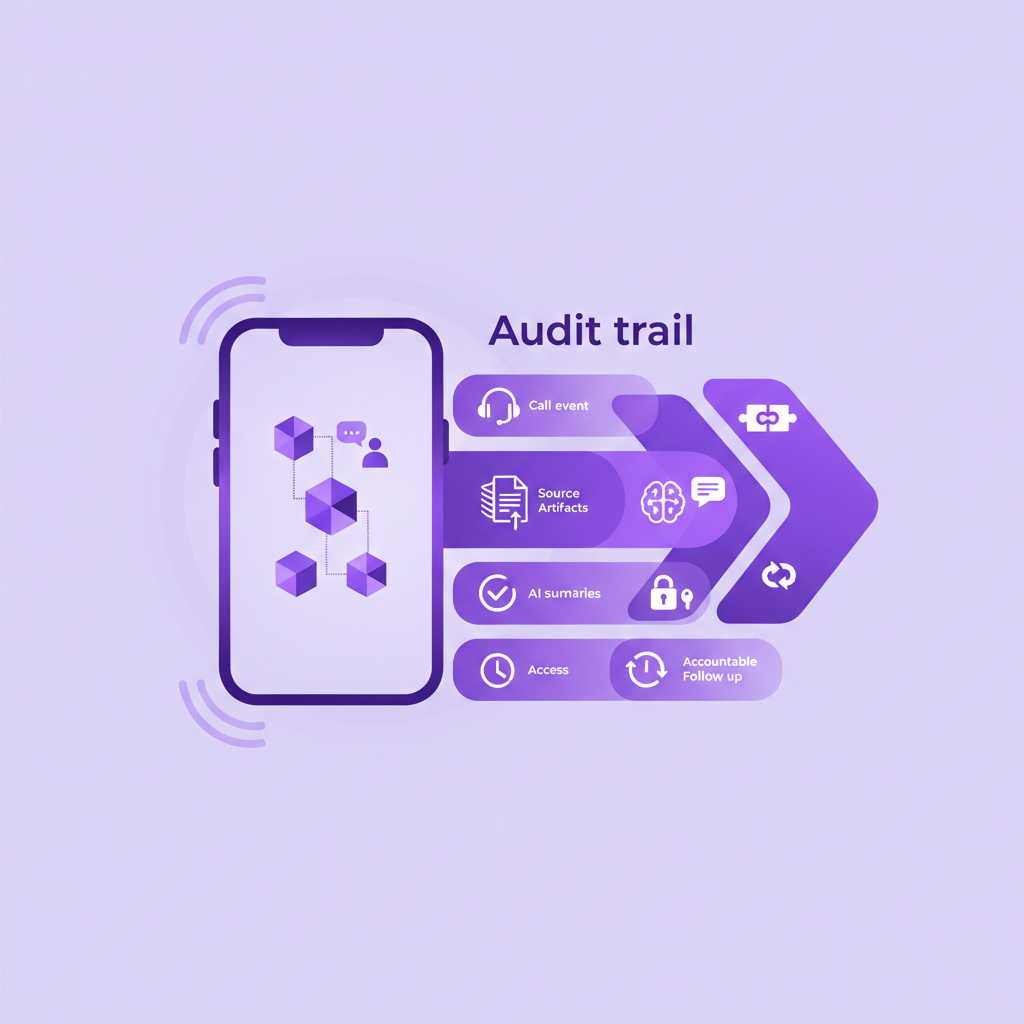
A Salesforce mobile call audit trail should show more than the fact that a call happened. It should connect the call event to the right customer record, preserve the available source evidence, distinguish AI generated outputs from the original conversation, and show what the business did next.
That sounds straightforward until employees start using ordinary mobile phones.
A planned call from a controlled dialler may create a neat chain of records. A customer callback to a rep mobile can be very different. The rep answers using the normal phone experience, resolves an urgent question, agrees a next step, and moves on. Salesforce may receive a manual note later, or nothing at all.
The result is not just incomplete activity reporting. It is an incomplete account of the customer relationship.
For sales leaders, service managers, Salesforce admins, and compliance teams, the practical question is this: if someone reviews the conversation later, can they understand what happened, which customer record it belongs to, what evidence supports the summary, and what action followed?
This guide explains what a useful mobile call audit trail should contain and where teams commonly lose trust.
What is a Salesforce mobile call audit trail?
A Salesforce mobile call audit trail is the connected record of a business mobile conversation and the actions around it.
Depending on company policy, configuration, and local rules, that record may include:
- The date and time of the call
- The call direction and duration
- The business number and external number involved
- The employee or business user associated with the call
- The Salesforce record matched to the conversation
- A recording where recording is appropriate and enabled
- A transcript where transcription is appropriate and enabled
- An AI summary and extracted key points
- The stated outcome
- The agreed next action and owner
- Access, retention, and review information
The word connected matters. A collection of separate artifacts is not yet a useful audit trail. The call event, customer identity, source material, summary, and follow up need to make sense together.
Why are ordinary mobile calls difficult to audit?
Most structured voice workflows begin in a known environment. The rep calls from a Salesforce dialler. The customer reaches a contact centre. The system already knows the agent, queue, phone number, and customer record.
Field conversations are less predictable.
A customer may call a rep directly. A service technician may return a call while travelling between jobs. An account manager may use the native phone interface because it is faster and familiar. Mobile data may be weak. The customer number may appear on more than one Salesforce record. The most important call of the week may never touch the calling app selected by the business.
If capture depends on a remembered employee action, the audit trail starts with a gap. Everything downstream then looks more complete than it really is.
An AI summary cannot explain a call that was never captured. A retention policy cannot retain an artifact that was never created. A manager cannot review a customer commitment that only exists in the rep's memory.
What evidence should Salesforce preserve after a mobile call?
There is no universal record design for every company. The right evidence depends on the purpose of the call, the Salesforce objects in use, company policy, and applicable legal requirements.
Still, a trustworthy workflow usually needs six layers.
1. The call event
Start with the basic event record.
Salesforce should be able to show when the call happened, whether it was inbound or outbound, how long it lasted, and which business user and phone numbers were involved. This is the foundation for activity reporting, ownership, and later review.
Event data alone is not enough, but without it the rest of the record has no reliable anchor.
2. The customer and Salesforce context
The call must be connected to the right context.
That might mean a Contact, Lead, Account, Opportunity, Case, Work Order, or another record used by the business. The correct choice depends on why the customer called and how the Salesforce organisation is designed.
Matching should also preserve uncertainty. A phone number may belong to several people. A caller may use a shared switchboard. A new prospect may not exist in Salesforce yet. In those cases, the safer record is often a visible call with a review state, not a confident but incorrect match.
Attaching a perfect summary to the wrong customer is worse than admitting the system needs help.
3. The source conversation
Where policy permits recording and transcription, the source conversation provides the evidence behind later interpretation.
The recording can preserve tone, sequence, and exact wording. The transcript can make the conversation searchable and easier to review. Neither should be treated as infallible. Audio quality, accents, names, technical language, and background noise can affect transcription accuracy.
The important design principle is traceability. A reviewer should be able to move from the summary back to the source material where they are authorised to do so.
4. The derived interpretation
AI summaries, sentiment, key points, objections, and suggested actions are derived outputs. They are useful because they turn a long conversation into something a busy team can scan and use.
They are not the original conversation.
A good audit trail makes that distinction clear. It should not present an AI summary as if it were a verbatim record. Where the decision is sensitive, users should be able to review the source evidence and correct the interpretation.
This becomes especially important when Salesforce automation uses the output to update an Opportunity, route a Case, create a task, or alert a manager.
5. The business outcome
What changed because of the call?
The customer may have agreed to a meeting, reported a service problem, changed a requirement, challenged a charge, requested a document, or asked for a callback. The useful record captures the outcome in language the business can report on and act on.
A generic note such as “good call” does not create accountability. A specific outcome such as “customer requested revised pricing by Thursday” does.
6. The follow up
An audit trail is incomplete when it describes a promise but loses the action.
The next step should have an owner, a clear action, and a date where appropriate. Salesforce should also show whether that action was completed, changed, reassigned, or left open.
This closes the gap between conversation intelligence and operational reality. The purpose is not merely to know what was said. It is to make sure the business responds.
How should AI summaries appear in an audit trail?
AI summaries should be concise, useful, and clearly linked to the call they describe.
For most mobile teams, a practical summary covers:
- Why the customer called
- The important facts discussed
- The decision or outcome
- Any risk, objection, or unresolved issue
- The agreed next action
- The person responsible for follow up
The summary should not quietly replace the transcript, recording, or human judgement. It should help a user decide what needs attention and where to look next.
Salesforce teams should also decide what happens when a summary is wrong. Can an authorised user correct it? Is the correction visible? Does the original source remain available under the relevant policy? Will downstream automation use the corrected value?
Those questions are more important than whether the summary sounds polished.
What should happen when Salesforce cannot match the caller?
Unknown does not always mean new.
An unmatched number could belong to a new prospect. It could also be an existing customer calling from a personal phone, a colleague using a shared number, or a supplier linked to several accounts.
A sensible workflow separates capture from identity resolution.
First, preserve the call event and available context. Second, check Salesforce for likely matches. Third, flag uncertainty where the evidence is not strong enough. Fourth, route the call for review or ask the user to confirm the relationship. Only then should sensitive automation create or update records.
This keeps the audit trail honest. It also reduces the risk that AI generated notes or follow up tasks land on the wrong record.
How do access and retention fit into the audit trail?
Access and retention are part of the design, not cleanup work for later.
Different users may need different levels of access. A rep may need the summary and next action. A manager may need the transcript for coaching. A compliance reviewer may need controlled access to the recording. A Salesforce admin may need metadata without needing to listen to the customer conversation.
The business should also decide how long each artifact is kept. Audio, transcripts, summaries, metadata, and tasks do not necessarily need identical retention rules. The correct policy depends on business purpose, customer expectations, contracts, and applicable law.
RocketCell does not replace those decisions. It helps create the mobile call records that make the decisions operationally possible.
A practical Salesforce mobile call audit trail checklist
Use these questions when reviewing a mobile call capture workflow:
- Are ordinary inbound and outbound mobile calls captured without relying on the rep to open a separate app?
- Does Salesforce receive a reliable call event with time, direction, duration, user, and phone number context?
- Is the call matched to the right Salesforce record?
- What happens when the match is uncertain or no record exists?
- Are recordings and transcripts available only where they are appropriate and enabled?
- Can an authorised reviewer trace an AI summary back to the source conversation?
- Are the outcome, next action, owner, and due date captured clearly?
- Can users correct inaccurate derived information?
- Are access and retention rules defined for each artifact?
- Does the process still work for direct customer callbacks and weak mobile data conditions?
If the answer to the first question is no, the rest of the design rests on incomplete source data.
Where RocketCell fits
RocketCell is built for Salesforce teams whose customer conversations happen through ordinary mobile calling.
Using an eSIM or SIM based business mobile setup, RocketCell captures normal business calls at the mobile network layer. It can then make those conversations available in Salesforce with the call record, matching context, recording and transcript where configured, AI summary, outcome, and next action.
The employee keeps the familiar mobile phone experience. The business gets a more complete and usable Salesforce record without depending on manual notes after every call.
That makes RocketCell an important first layer in the audit trail. It does not replace a company's access policy, retention policy, legal review, or Salesforce governance. It helps ensure those controls have a captured and connected mobile conversation to work with.
The strongest audit trail starts with capture
A trustworthy Salesforce mobile call audit trail is not a long note attached to a customer record. It is a connected chain from the call event to customer context, source evidence, interpretation, outcome, and action.
For mobile teams, the hardest part often comes before AI, reporting, or review. The ordinary phone call has to reach Salesforce in the first place.
When capture is complete, matching is careful, source artifacts are governed, and follow up is explicit, Salesforce becomes a better record of the customer relationship. It shows not only that a conversation happened, but also what the business understood and what it did next.